Showing posts with label Productivity Tips. Show all posts

From Hot Mess to On Top: Simple Project Management Systems for Freelancers


Confession time! Not long ago, my project management system was a hot mess. Picture sticky notes everywhere on my laptop, my fridge, just everywhere! Projects were slipping through the cracks, deadlines were missed, and my stress level was? Through the roof.

Then I discovered simple project management tools, and my freelancer life changed dramatically.

Step 1: Goodbye Sticky Notes, Hello Trello!

The first game-changer was adopting Trello. Visual and intuitive, Trello boards replaced my chaotic sticky notes with neat, movable cards organized into lists: To-Do, In Progress, and Completed. The satisfaction of dragging a task from "In Progress" to "Completed"? Priceless!

Step 2: Calendar Blocking

Next, I integrated calendar blocking. Each task on Trello got a specific slot in my Google Calendar. This kept me accountable and ensured I was realistic about deadlines and workload.

Step 3: Weekly Reviews

Finally, I started conducting weekly reviews every Sunday. Spending 15 minutes reviewing what worked, what didn’t, and what needed adjusting. This made sure I stayed agile and productive.

Results?

  • Less stress 

  • Clearer project visibility 

  • Happier clients 

  • More productive me!

Now it's Your Turn! If you haven't already transitioned from sticky note chaos to smooth project sailing, this is your reminder that it's time! Trust me, you can do this too. Pick one simple system to implement today. Your freelance journey will thank you!

Feel encouraged? Share this post with a freelancer friend who needs to ditch the sticky notes and reclaim their sanity!


Ready to Level Up Your Skills?

Join our Virtual Assistant Cohort and learn how to master CRM and automation tools like a seasoned pro. Spaces are limited, so secure your spot today!


Time is Your Most Valuable Asset: 5 Essential Tools for Freelance Assistants


5 Time-Saving Tools Every Freelance Assistant Should Know

As a freelance assistant, your ability to manage time effectively can make or break your success. You're coordinating emails, executing client tasks, and maintaining schedules, all while projecting an image of calm competence.

Having the right digital toolkit can transform how you work, turning chaos into clarity. Let's explore five time-saving tools that deserve a permanent place in your professional arsenal.

1. ClickUp: Your Command Center

Task management becomes seamless with ClickUp, an all-in-one platform that centralizes your workflow. With this powerful tool, you can:

  • Create structured task hierarchies with subtasks and checklists
  • Establish clear priorities and deadlines
  • Collaborate with clients in real-time within a single environment

Instead of frantically switching between multiple applications, ClickUp provides one comprehensive dashboard where everything lives together. This integration alone can reclaim hours of your week.

2. Canva: Professional Design Made Accessible

Client proposals, reports, and visual assets all require a professional touch. Canva empowers non-designers to create polished materials that elevate your service offerings.

Think of Canva as your design assistant. With its extensive template library, you can produce client-ready materials in minutes rather than hours. Creating reusable templates for recurring projects further streamlines your process, allowing you to maintain brand consistency with minimal effort.

3. Grammarly: Communication Confidence

In client communications, precision matters. Grammarly serves as your behind-the-scenes editor, ensuring your writing remains clear, correct, and professional.

This tool does more than catch typos; it analyzes tone, suggests more effective phrasing, and helps you communicate with intention. Consider it a communication safeguard that preserves your professional image across all written interactions.

4. Zapier: Automation That Works While You Don't

Automation represents one of the smartest investments for freelancers. Zapier connects your digital ecosystem so routine tasks happen automatically:

  • Client form submissions can flow directly into your CRM
  • Booking confirmations can generate calendar entries without manual input
  • Email attachments can be organized in your cloud storage automatically

By creating even a few strategic automations, you effectively extend your productive capacity without extending your working hours.

5. Google Workspace: The Reliable Foundation

Sometimes the most valuable tools are the most familiar ones. Google's integrated suite offers:

  • Seamless real-time collaboration capabilities
  • Instant updates across devices
  • Universal accessibility from any location

The reliability of Google Workspace provides a stable foundation for client projects, especially when unexpected revisions or time-sensitive updates arise.

Finding Balance Through Efficiency

The freelance assistant role requires balancing meticulous work with sustainable practices. Implementing the right tools doesn't just enhance your efficiency; it elevates your professional presence while protecting your well-being.

Consider today an opportunity to evaluate and upgrade your digital toolkit. Your clients will notice the difference in your service delivery, and you'll appreciate the newfound space to breathe between tasks.

What time-saving tool has transformed your workflow? We'd love to hear about your experiences.

The Power of Active Listening: Elevating Your Freelance Client Relationships


The Power of Active Listening: Elevating Your Freelance Client Relationships


Great communication forms the foundation of every successful freelancer-client relationship. Of all the skills in your professional toolkit, active listening stands out as a powerful one that can truly set you apart from the competition.

From client meetings to addressing concerns and collaborating on solutions, mastering the art of active listening transforms how you connect with clients and, ultimately, how successful your projects become.

What Is Active Listening?

Hearing the words someone says is just the beginning. Active listening goes several steps further:

  • Giving your full attention to the speaker
  • Understanding both their message and intent
  • Responding thoughtfully to what's being shared
  • Minimizing distractions and interruptions

Think of active listening as building a bridge of trust and understanding between you and your client—one conversation at a time.


The Power of Active Listening: Elevating Your Freelance Client Relationships


Why Does Active Listening Matter for Freelancers?

Yes, freelancing requires you to deliver quality work to your clients, but that's not all; you also need to create a strong relationship with them. In many ways, active listening can change the game for you.

Here are some points to note:

  • By listening actively, you are less likely to misunderstand the project requirements.

  • Understanding your client’s pain points helps you deliver tailored solutions and makes you a better problem-solver.

  • Clients feel valued and heard, making them more likely to return to you for future work.

  • Better clarity reduces miscommunication and misunderstandings, making projects smoother.

Why Active Listening Matters for Freelancers

While delivering quality work is essential, building strong client relationships is equally important. Here's how active listening changes the game:

  • You're less likely to misunderstand project requirements, saving time and preventing frustration
  • By understanding your client's pain points, you can deliver more tailored solutions
  • Clients feel valued and heard, increasing their loyalty and likelihood of returning
  • Better clarity reduces miscommunication, making projects run more smoothly

6 Practical Steps to Enhance Your Active Listening

1. Focus Fully on the Client

When communicating, eliminate distractions: close unnecessary tabs, silence notifications, and give your client undivided attention. This isn't the time for "multitasking"; it's about creating space for genuine understanding.

If you're uncertain about what your client is expressing, ask clarifying questions to ensure you're both on the same page.

2. Use Open-Ended Questions

Avoid close-ended or leading questions that limit responses. Instead, invite your client to share more details about their vision with questions like:

"Can you tell me more about your vision for this project?" 

"What's the biggest challenge you're facing right now?"

These types of questions encourage detailed responses and provide deeper insights into their needs and expectations.

3. Paraphrase and Clarify

Confirm your understanding by repeating what the client said in your own words:

Client: "I'm looking for a social media calendar that's easy to update."

You: "So you're looking for a simple, flexible calendar format that you can adjust as required. Is that correct?"

This technique not only ensures clarity but also reassures clients that you're actively engaged with their needs.

4. Observe Non-Verbal Cues

During video calls, pay attention to facial expressions, tone of voice, and body language. These subtle signals often provide valuable context to the words being spoken. For instance, a client's hesitation might signal uncertainty about a particular decision or direction.

5. Respond Thoughtfully

Some people listen just to respond rather than to understand. Avoid this trap by taking a moment to process what your client has shared before crafting your response. Address their concerns directly with phrases like:

"That's a great point. Here's how I think we can address it."

"I hear your concern about deadlines. Let's create a timeline that works for both of us."

6. Follow Up After Discussions

After meetings or important conversations, summarize the key points and action steps in a follow-up email:


The Power of Active Listening: Elevating Your Freelance Client Relationships

This practice reinforces your understanding and keeps both parties aligned on expectations and deliverables.

Active Listening in Action: Real-World Scenarios

Scenario: Misaligned Expectations

Without Active Listening:

Client: "I want the report to focus on customer feedback." 

Freelancer: "Got it. I'll add some graphs and charts." 

Result: The client receives a report filled with visual data but no actionable insights from customer feedback.

With Active Listening:

Client: "I want the report to focus on customer feedback." 

Freelancer: "When you say focus on customer feedback, do you mean including specific comments or analyzing trends in the data?" 

Result: The freelancer delivers a report that perfectly aligns with the client's needs.

Scenario: Handling a Concern

Without Active Listening:

Client: "I'm not sure this draft fits our brand tone." 

Freelancer: "But I followed the brief exactly." 

Result: The client feels dismissed, and tension arises.

With Active Listening:

Client: "I'm not sure this draft fits our brand tone." 

Freelancer: "Thank you for the feedback. Could you share more about what aspects don't feel aligned with your brand? This will help me make targeted adjustments." 

Result: The client feels heard, and the freelancer gains valuable clarity to improve the draft.

Your Listening Challenge

Next time you're in a client meeting or discussing a project, take a deep breath, tune in, and practice these active listening techniques. This seemingly simple skill can dramatically elevate your communication effectiveness and help you stand out as a truly exceptional freelancer.

Remember, it's not just about hearing words but understanding what your clients truly mean. What active listening technique will you implement in your next client interaction?


An Executive Assistant’s Guide to Mastering Time Management


Time management skills are essential skills for freelancers offering executive assistance and project management services. Why? As an Executive Assistant, your role revolves around managing your client's schedule. Without essential time management skills, accomplishing this task becomes challenging.


Executive Assistants and Project Managers must juggle multiple tasks simultaneously, highlighting the need for adept scheduling skills. Without proper scheduling, errors may occur, potentially affecting the project's timeline, leading to task delays, increased project costs, and other consequences.


As an independent professional, effectively managing your time ensures that:


You can meet Deadlines Meeting deadlines is essential for maintaining client satisfaction and building a good reputation. Effective time management enables you to allocate sufficient time to each task, ensuring that projects are completed on time.

You will exceed client expectations Clients expect high-quality work delivered promptly. By managing your time efficiently, you will meet and exceed their expectations by delivering work ahead of schedule or with better quality.

Maintaining Work-Life Balance Effective time management allows you to maintain a healthy work-life balance. By allocating time for work, leisure, and personal commitments, you can prevent burnout and maintain productivity in the long run.


Here are some practical strategies for time management:

Prioritize Tasks

Start by making a list of all your tasks and then sort each task according to its priority level 

High priority: These tasks directly contribute to your goals or client deliverables and must be done immediately.

Medium priority: These tasks are also important but can be scheduled. They don’t have to be done immediately. 

Low-priority tasks: These tasks can be done after the medium-priority task or delegated.


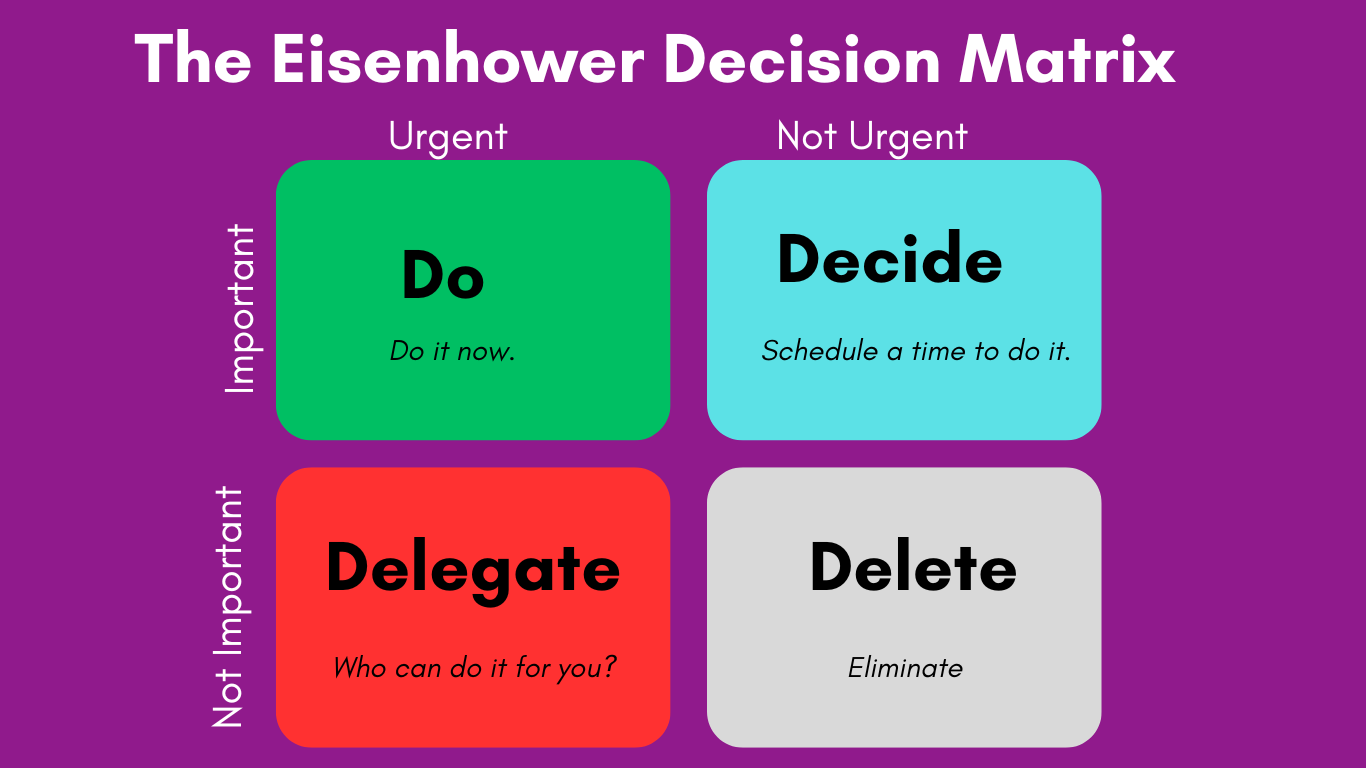
The Eisenhower Matrix is a great tool that can help categorize tasks and delegate tasks that don’t need your direct attention. The matrix will help you to assess what tasks to do, schedule, delegate, and eliminate. Here’s what the Eisenhower matrix looks like:


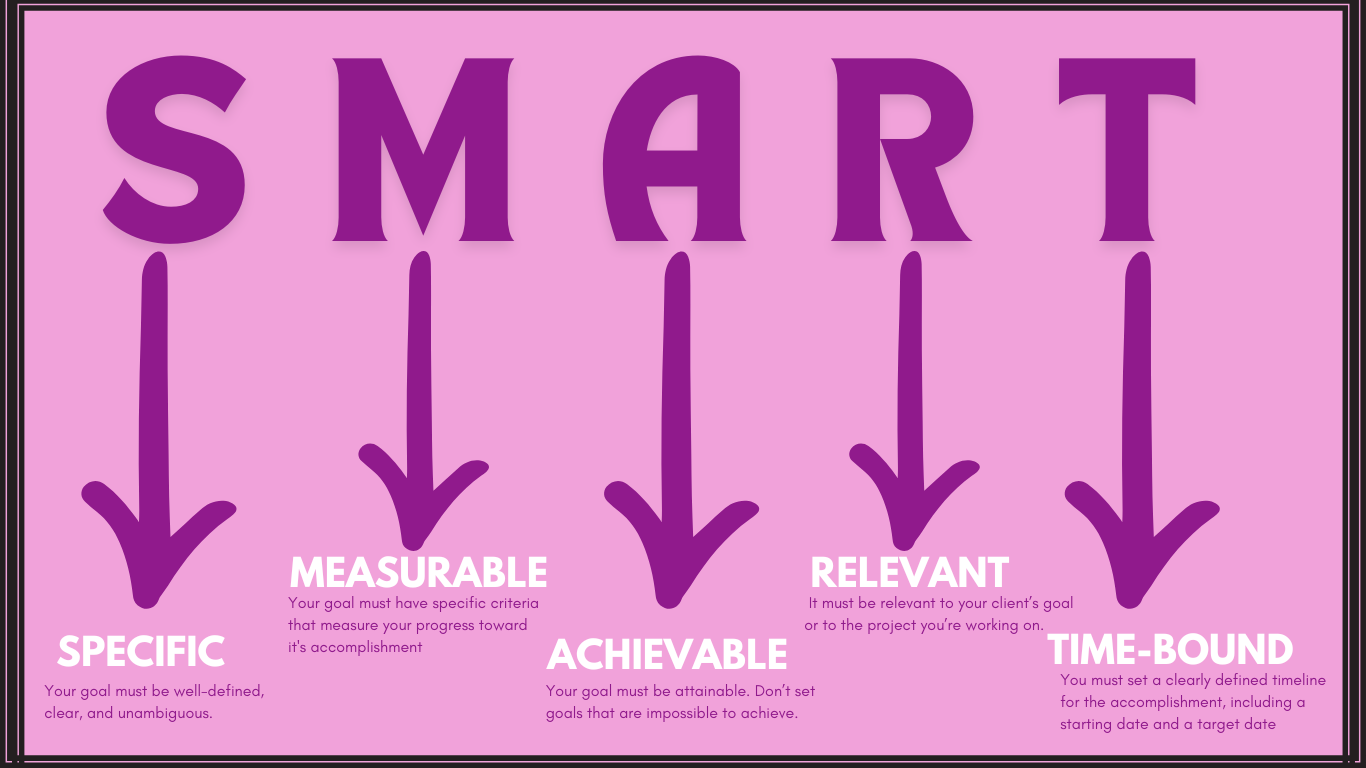
Set SMART Goals 


SMART goals are goals that are: 


Use Time Blocking 


Time blocking is a time management technique that divides your entire day into blocks of time. 

This allows you to allocate a specific task or group of tasks to each block throughout the day.

This helps minimize distractions and ensures that you are focused on one task at a time.


Utilize Tools and Technology 


This is my favorite part! Project management tools!

Leverage project management tools like Asana, Trello, or Monday.com to organize your tasks, set deadlines, and track your progress. 

Calendar applications like Google Calendar, Calendly, or Microsoft Outlook can help schedule appointments, meetings, and reminders.


Practice the Pomodoro Technique


A Pomodoro technique involves breaking your tasks into time intervals (usually 25minutes time slots but you can decide which works best for you). 

During each Pomodoro, you focus completely on the task for the specified number of minutes until your alarm goes off. You will not take your eyes off to check your mail, visit social media, or do anything that distracts you normally. 

You can take a 5-minute break after each Pomodoro. 

This technique helps maintain concentration and prevent burnout.


Minimize Distractions 


Identify common distractions in your work environment and take steps to minimize them. This may include turning off notifications, setting boundaries with family or roommates, or using website blockers.


Regularly Review and Adjust


Review your time management strategies periodically to identify what's working well and what needs improvement. 

One of the skills required by an EA is flexibility and the willingness for adjustments. Apply these based on changing priorities or circumstances.


Implementing these practical strategies as an executive assistant and project manager can help optimize your time, increase productivity, and deliver exceptional results for your clients.


Email Marketing for Virtual Assistants: Certification Courses to Boost Your Career


 Let's start from the basics. What is an email?

An email (Electronic MAIL) is a method of exchanging electronic messages between people using electronic devices such as computers, smartphones, or tablets. It allows us to send messages, files, or documents to one or more recipients over the Internet. Emails typically consist of :

  • Sender's address

  • Recipient's address

  • Subject line

  • The message body, and 

  • Optional attachments. 


You can use Email for both personal and professional communications.

Over the years, Emails have become a fundamental tool in modern-day business operations, marketing, and personal correspondence.


Email is a vital tool for inbound marketing, facilitating direct communication between businesses and their target audience. As one of the most cost-effective marketing tools available, having an in-house employee who understands the nuances of effective email marketing components is crucial.


As a freelance marketer or virtual assistant (VA) handling marketing responsibilities, mastering email marketing is paramount for excelling in your role. Several certification courses are available to help you develop the skills and knowledge needed to excel in this field. In this blog post, we'll explore some of the top certification courses that can help you elevate your proficiency in email marketing.


Top Certification Courses in Email Marketing


HubSpot Email Marketing Certification

HubSpot is one of my favorite channels for FREE marketing training and certifications. This particular course is structured to help you conceptualize email marketing in three phases: 


  • Preparing

  • Sending, and 

  • Optimizing. 


It offers a comprehensive Email Marketing Certification course that covers everything from building an email marketing strategy to optimizing email campaigns for success. This course provides valuable insights into crafting compelling email content, segmenting your audience, and measuring the effectiveness of your campaigns using data analytics.


The certification closes out with a final lesson that allows you to explore the HubSpot Free Email tool, so you can begin taking action on everything you’ve learned.


Mailchimp Email Marketing Certification

Mailchimp is a leading email marketing platform used by millions of businesses worldwide. Their Email Marketing Certification course is designed to help marketers learn how to use the Mailchimp platform effectively to create, send, and analyze email campaigns. This course covers everything from designing eye-catching email templates to understanding deliverability best practices.


Constant Contact Email Marketing Certification

Constant Contact is another popular email marketing platform that offers a certification course for aspiring email marketers. This course provides hands-on training on creating engaging email content, growing your email list, and automating email campaigns for maximum impact. With Constant Contact's certification, you'll gain the needed skills to drive results and grow your business through email marketing.


Udemy Email Marketing Masterclass

Udemy is a renowned online learning platform that offers a wide range of courses, including an Email Marketing Masterclass. This comprehensive course covers the fundamentals of email marketing, including list building, segmentation, copywriting, and automation. Whether you're a beginner or an experienced marketer looking to refresh your skills, this masterclass has something for everyone.


Google Analytics Individual Qualification (GAIQ)

While not specifically focused on email marketing, earning the Google Analytics Individual Qualification (GAIQ) certification is essential for any marketer.

Google Analytics will help you to understand how to analyze website traffic and user behavior. This is crucial for optimizing email marketing campaigns and measuring their impact. A GAIQ certification on your resume demonstrates your proficiency in digital analytics, which is highly valued in the marketing industry.


Investing in email marketing certification courses is a smart move for anyone looking to advance their career in marketing or freelancing.


These courses provide valuable knowledge and skills. They will help you stand out in a competitive job market and deliver exceptional results for your clients or employers.


Top 10 Work-From-Home Mistakes You Should Avoid for a Happy and Productive Day!

Top 10 Work-From-Home Mistakes You Should Avoid for a Happy and Productive Day!


Imagine waking up, making your favorite coffee, and getting ready to tackle the day in your cozy home office. However, before you start your work, let's talk about some common mistakes that you can avoid making your work-from-home experience more productive and enjoyable.


Common mistakes that you can avoid to make your work-from-home experience more productive and enjoyable.


Poor Time Management

Have you ever found yourself lost in the endless scroll of social media instead of tackling your to-do list? 


Yeah!


We've all been there! 

So, what should you do to avoid this? 


Set a schedule! 

Setting your daily schedule and sticking to it can help you stay on track and avoid burnout.


Disorganized or Cluttered Workspace

A cluttered workspace reduces productivity without you knowing it! You spend way more time looking for something you need or just waste time losing focus when you need to give your 100% to the task at hand!


Your workspace should be your sanctuary, not a war zone of clutter! 


Take a cue from Marie Kondo, the Japanese organizing consultant, author, and TV show host, best known for her KonMari method of tidying up and decluttering who encourages people to declutter their homes by keeping only items that "spark joy" and letting go of possessions that no longer serve a purpose. 


Decluttering your desk to create a zen zone ultimately boosts productivity.


The Overwork Trap

Don’t get trapped into doing too much! Many folks who work from home feel that because they have the freedom of being in their work zone easily without the need to commute, they fall into the trap of working continuously with little or no time for breaks!


Working from home doesn't mean you need to be glued to your laptop 24/7. 

Remember to clock out and give yourself some well-deserved downtime to recharge.


Distractions

Working from the comfort of your home can come with its fair share of distractions especially if you don’t have to check in regularly with your colleagues! 

From fluffy pets or kids demanding attention to Netflix whispering sweet nothings, or your bed being too close and inviting for comfort, distractions are everywhere for someone who works from home! So find ways to minimize all these distractions and stay focused on the task at hand.


Self-Care Neglect

If you’ve ever been greeted with the image of a colleague who appears for your work Zoom meeting in their pajamas, then you’ll understand fully the point I’m trying to make here.


Self-neglect goes beyond appearances, it also includes how well you eat, move your body, etc while working from home!


Your well-being should always come first! Don't forget to move your body, nourish your soul, eat healthy meals, and take regular breaks to avoid burnout.


Loneliness

Someone once told me that the kind of person who will enjoy working from home is the one who’s introverted and enjoys their own company.


While I agree that working from home can sometimes be lonely especially if you work for a small organization with very little staff, working from home doesn’t have to be lonely!


Yes! It can be easy to feel isolated when your only coworkers are houseplants but as with everything in life, you have to make the conscious effort to fight loneliness. 


This you can do by making an effort to connect with friends, family, and colleagues to keep those social juices flowing.


Communication Glitches

Having a face-to-face conversation with someone where you can see their facial expression and read their mood around the time the communication takes place or before will always trump written communication.


Chats, emojis, and other forms of written communication can be easily misinterpreted leading to communication mishaps. And considering that remote workers communicate via this channel a lot could be cause for some worry. So, it's important to always keep communication open and clear to avoid misunderstandings. Avoid using too many emojis when communicating with colleagues.


A dodgy internet connection could also cause breaks in communication. It is important, especially in countries such as Nigeria, to have more than one internet service provider so that you can quickly switch in case your connectivity is broken. 


Tech Troubles

Ah, the joys of technology! From frozen screens to mysterious error messages, tech issues can throw a wrench in your plans. Keep calm and Google on, my friend.


Unclear Boundary

Setting boundaries with family members or roommates at work can be tricky but is important!


It is not okay for family members to keep disturbing you while you’re on a work call or meeting. Be upfront about your work hours! Let everyone know that you are not to be disturbed at specific times of the day when you’re in your workspace. If they need to communicate urgently, then create the right channels for such communications i.e. a quick WhatsApp or text message to get your attention. After all, if you were at work in a physical location away from your home, they could not just barge in on you at work without prior notice!


I cannot emphasize this enough, have a designated workspace and let everyone know that this is your workspace, and you need to avoid interruptions during crunch time.


Procrastination - the stealer of Time

There's a reason why this phrase exists! 

Procrastinating makes you delay or postpone tasks that you need to accomplish. So instead of using your time effectively and efficiently to tackle important tasks, you end up wasting time by putting them off until later. This robs you of the precious time you have to achieve your goals, complete your responsibilities, and make progress in your work.


Don’t do it!


Remember that time is a finite resource, and when you procrastinate, you are squandering the opportunity to use your time productively. 


Working from home may create the illusion of having plenty of time and may tempt you to procrastinate. However, whether you work remotely or commute to a physical workplace, maintaining productivity is crucial. 


Let's shift away from the mindset of "Why do today what you can put off until tomorrow" and embrace "Why do tomorrow what you can do today." It's time to get to work! 


Combat procrastination by breaking tasks into manageable chunks and rewarding yourself for each milestone achieved. Make the most of your time and stay on track towards your goals!


There you have it, folks! By sidestepping these common work-from-home pitfalls, you'll be well on your way to WFH wizardry in no time. Remember, it's all about finding what works best for you and creating a harmonious balance between work and play.


Happy telecommuting!